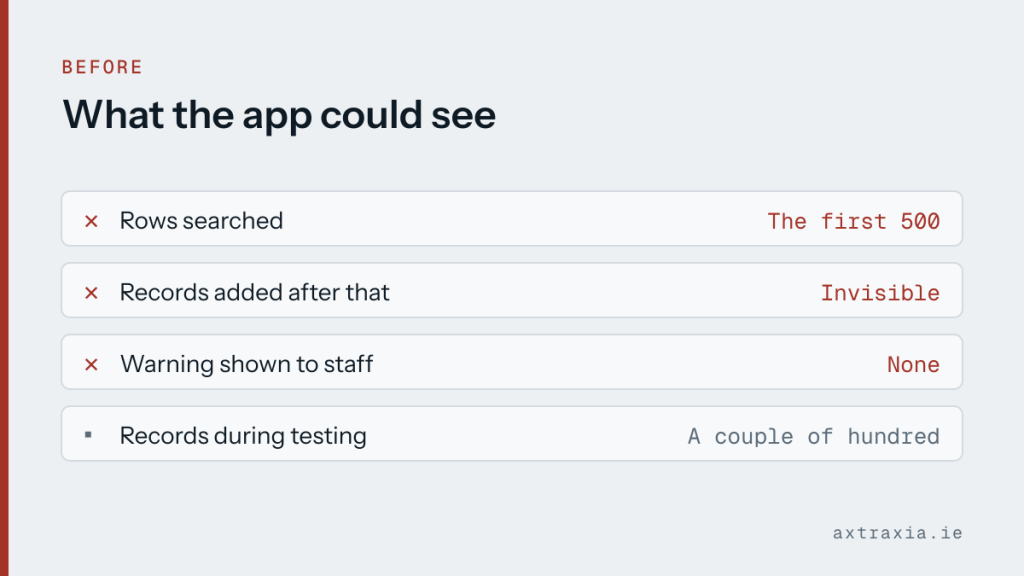

An internal app used to look up customer records worked perfectly for months. Then staff started saying records were missing. The records were there; the app could not find them.
The search was only ever looking at the first five hundred rows. Everything added after that was invisible to it, and the app gave no indication that it was searching a fraction of the data.
Why it passed testing
This is a delegation problem. Some operations can be handed to the data source to run, and some cannot, in which case the app pulls a limited number of rows and works on those locally. The limit defaults to five hundred.
This one was a Power Apps canvas app reading from a SharePoint list, which is the most common place to meet it. The same trap exists on any platform that copies a slice of the data to the client and filters it there, and it always fails the same way: quietly, and only once you have enough records for it to matter.
During the build the list had a couple of hundred test records, so everything was inside the limit and everything worked. The failure only appeared once real use pushed the data past a threshold nobody had thought about. The platform does warn about this while building, with a small marker that is easy to treat as noise.
The fix
The searches were rewritten to use operations the data source can run itself, so the filtering happens where the data lives rather than after a partial copy arrives. The app now searches everything regardless of size, and got faster as a side effect, because it stopped hauling rows across the network to discard them.
Raising the row limit is the tempting shortcut. It moves the failure rather than removing it, and it arrives again later with more data and less warning.
Worth doing today
If you have an internal app searching a list that keeps growing, test it against a record you know was added recently, not one from the demo data. That single check finds this immediately.
If you are having something built, ask directly how it behaves when the data is ten times bigger. It is a fair question and the answer tells you a lot.
It is also worth knowing what a build like this commits you to before starting, because what a tool connects to decides the per-person cost. If an app of yours is behaving oddly as it grows, describe what it does.